Introduction
Your home can do a lot more than just shelter you.
In 2026, it can learn your schedule, secure itself, save energy, and respond to your voice all while you go about your day.
That's what home automation is really about. Not buying the flashiest gadgets. Making everyday life genuinely easier.
- Forgot to turn off the lights? Your home handles it.
- Guest arriving while you're at work? Unlock the door from your phone.
- Want the perfect temperature before you wake up? Done automatically.
Smart home devices are now easier to set up and more reliable, and thanks to the Matter standard they talk to each other across ecosystems like Amazon Alexa, Google Home, and Apple HomeKit.
In this guide, you'll find the best smart home devices worth adding to your setup in 2026, what each one does, why it matters, and what to look for before you buy.
Quick Overview
- Smart home devices automate lighting, security, climate control, and energy use, making everyday living more convenient and efficient.
What Are Smart Home Devices?
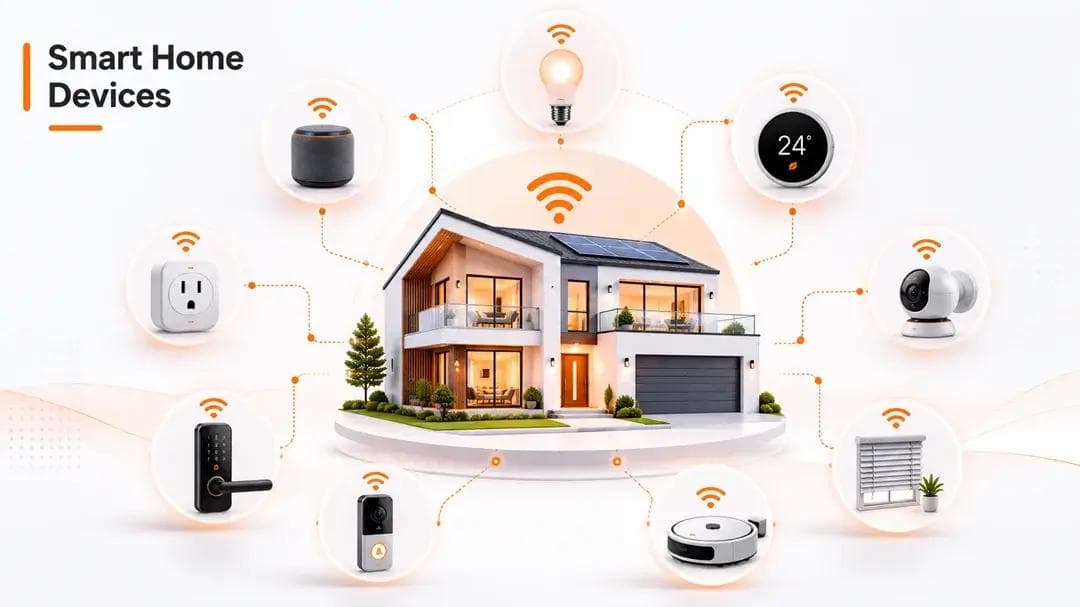
According to industry definitions, smart home devices are internet-connected products that automate and remotely control lighting, security, climate, energy use, and household tasks all through apps, voice assistants, or automation rules.
In simple terms, if it connects to your Wi-Fi or a smart hub and makes your home do something automatically, it's a smart home device.
How do they connect?
| Connection Type | How It Works | Best For |
|---|---|---|
| Wi-Fi | Connects directly to your router | Easy setup, everyday devices |
| Zigbee | Uses a hub, low power consumption | Multiple bulbs, sensors |
| Z-Wave | Hub-based, strong interference resistance | Locks, security devices |
| Matter | Universal standard, works across ecosystems | Future-proof smart homes |
The biggest shift in 2026 is Matter, a universal smart home standard backed by Apple, Google, Amazon, and Samsung SmartThings. Matter IoT devices work across all ecosystems, so you're never locked into one brand.
Best Smart Home Devices for Home Automation in 2026
1. Smart Speaker / Display
The command center of your entire smart home setup.
A smart speaker or display lets you control everything else with your voice or a tap. Ask it to play music, check the weather, dim the lights, or lock the front door. A smart display goes further by showing camera feeds, recipes, or video calls right on screen.
What to look for:
- Screen size if you want a display
- Sound quality
- Which ecosystem it supports these shapes every other device you buy
2. Smart Thermostat
One of the highest-ROI smart home devices you can buy.
A smart thermostat learns your daily routine and adjusts your home temperature automatically. No more heating or cooling an empty house.
Key benefits:
| Feature | What It Does |
|---|---|
| Geofencing | Detects when you leave, switches to energy-saving mode |
| Learning mode | Adapts to your schedule over time |
| Remote control | Adjust temperature from anywhere via app |
| Energy reports | Shows usage patterns and savings |
A good Wi-Fi thermostat can reduce your energy bill by 10-15% annually, which adds significantly over time.
What to look for:
- HVAC system compatibility
- Geofencing support
- Matter or HomeKit thermostat certification for cross-ecosystem use
3. Smart Plug
The simplest way to make any regular appliance smart, no rewiring, no installation.
Plug it into your wall outlet, connect your lamp, coffee maker, or fan, and control it remotely from your phone or by voice.
Why the energy monitoring version is worth it:
- See exactly how much power each device draws
- Identify energy-hungry appliances instantly
- Set schedules to cut phantom power usage
What to look for:
- Energy monitoring feature
- Indoor vs outdoor rating
- Matter compatibility for ecosystem flexibility
4. Smart Lighting / Bulb
The easiest entry points into home automation and one of the most satisfying.
Swap out a regular bulb, connect it to your Wi-Fi or Zigbee hub, and control your lights from anywhere on your phone, with your voice, or on a set schedule.
Popular automations people use:
| Automation | How It Helps |
|---|---|
| Turn off at midnight | Never waste electricity overnight |
| Dim at sunset | Automatic ambiance, no effort |
| Turn on when you arrive home | Welcoming and practical |
| Vacation mode | Random on/off to deter intruders |
What to look for:
- Zigbee vs Wi-Fi (Zigbee more stable for multiple bulbs)
- Color temperature range
- Whether you need a dedicated hub like a Zigbee hub
5. Smart Lock
No more fumbling for keys. No more wondering if you locked the door.
A smart lock lets you lock and unlock your door from your phone, set temporary access codes, and get notified every time your door opens.
Why families love it:
- Kids get in without a key
- Grant time-limited access to cleaners or delivery
- Auto-lock kicks in if you forget
- Get instant alerts when the door opens
What to look for:
- Battery life
- Auto-lock feature
- Fits your existing deadbolt
- Matter smart home support for future-proofing
6. Smart Security Camera
Your home, watched over 24/7 from anywhere.
Modern smart security cameras don't just record. They use AI-powered detection to tell the difference between a person, a car, or a tree moving in the wind, so you only get alerts that matter.
Indoor vs Outdoor Quick Comparison:
| Indoor Camera | Outdoor Camera | |
|---|---|---|
| Weather resistance | Not needed | Essential |
| Night vision | Good to have | Must-have |
| Field of view | Narrower | Wide angle preferred |
| Typical use | Baby monitor, entry points | Driveway, garden, perimeter |
What to look for:
- Local storage over cloud (more private, often subscription-free)
- Night vision quality
- AI motion detection accuracy
7. Smart Video Doorbell
See who's at your door before you open it from anywhere in the world.
A smart video doorbell gives you live video, two-way conversation with visitors, and motion alerts the moment someone approaches.
What it replaces:
- Peephole - you see visitors remotely, not just at the door
- Intercom - talk to delivery people without opening up
- Security guard - records and alerts around the clock
What to look for:
- 1080p resolution minimum
- Wide field of view
- Subscription-free local storage option
- Wired vs battery-powered wired is more reliable
8. Robot Vacuum
Set it. Forget it. Come home to clean the floors.
Schedule it to clean every morning before you wake up. Newer models map your entire floor plan, avoid obstacles, and self-empty their dustbins, making them almost completely hands-off.
Feature comparison - what matters most:
| Feature | Basic Model | Premium Model |
|---|---|---|
| Smart mapping | Limited | Full floor plan |
| Self-emptying base | No | Yes |
| Mopping function | No | Some models |
| Obstacle avoidance | Basic | AI-powered |
| Battery life | 60–90 min | 120–180 min |
What to look for:
- Smart mapping for multi-room homes
- Self-emptying base if you want truly hands-off cleaning
- Suction power suitable for carpets vs. hard floors
9. Smart Switch / Dimmer
Smart control over your existing lights without replacing a single bulb.
A smart switch replaces your regular wall switch and gives you remote control, scheduling, and dimming all through your phone or voice. Great, if you have fixtures, you already like.
Smart switch vs smart bulb - which should you choose?
| Smart Switch | Smart Bulb | |
|---|---|---|
| Replace bulbs? | No | Yes |
| Works with existing fixtures | Yes | Depends |
| Controls multiple lights | Yes, on one circuit | One bulb at a time |
| Needs neutral wire | Usually yes | No |
| Cost per room | Lower | Higher for many bulbs |
What to look for:
- Neutral wire availability in your wall
- Single vs multi-pole configuration
- Zigbee dimmer support for hub-based setups
10. Smart Blind / Curtain Controller
Automate your blinds to open with the sunrise, close for privacy at night, or adjust based on room temperature.
Curtain robots and motorized blind controllers can be retrofitted onto your existing blinds with no replacement needed.
Real benefits beyond convenience:
- Blocking afternoon sunlight reduces AC load noticeably
- Waking up to natural light genuinely improves your mornings
- Privacy mode closes everything with one tap or voice command
- Pairs with your thermostat for smarter energy management
What to look for:
- Motor strength for heavier curtains
- Retrofit vs built-in installation
- Battery vs wired power source
- Apple HomeKit or Matter compatibility
Why Matter Protocol Changes Everything
- Matter-compatible smart home devices work across all ecosystems, future-proofing your setup no matter which brand you choose.
How to Build Your Smart Home Setup
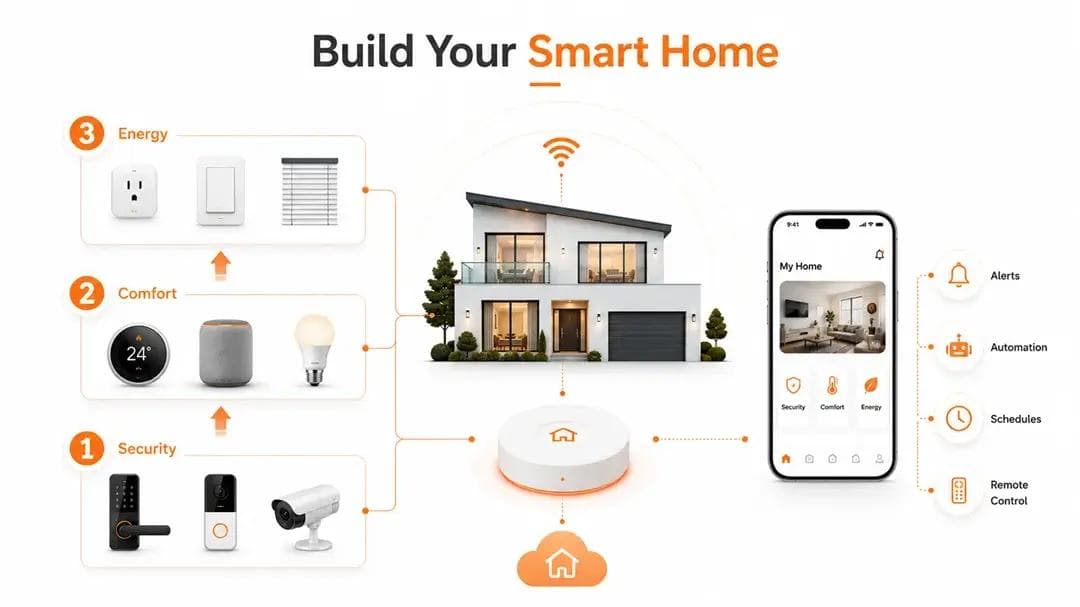
Don't try to automate everything at once. Built in layers.
The right order:
| Priority | Category | Start With |
|---|---|---|
| 1st | Security | Smart lock, video doorbell, camera |
| 2nd | Comfort | Thermostat, smart speaker, lighting |
| 3rd | Energy | Smart plug, dimmer, blind controller |
Three rules to follow:
- Pick one ecosystem first - Alexa, Google Home, or Apple Home (formerly HomeKit). Every device you buy should work with it. Mixing ecosystems adds unnecessary complexity.
- Choose Matter-compatible devices where possible - Matter IoT support means your devices can work across platforms. It's the best home automation system approach for anyone building long-term.
- Keep smart home installation simple at first - Two or three devices that work flawlessly beat ten that frustrate you. Add more as you get comfortable.
Conclusion
Smart home technology in 2026 is more accessible, more reliable, and more connected than ever.
Whether you start with a single smart bulb or build a fully automated setup, the 10 devices in this list give you a solid foundation. Pick what fits your life. Start small. Expand gradually.
The best smart home system isn't the one with most devices. It's the one where every device works together without friction.
What makes that seamless experience possible behind the scenes is a reliable cloud platform with the layer that keeps your devices connected, responsive, and secure.
That's what Promeraki specializes in. IoT cloud platform engineering built for the hardware manufacturers powering the smart home ecosystem.
The Invisible Layer That Makes Smart Homes Work
Promeraki delivers IoT platform engineering for the hardware manufacturers behind your favorite smart home devices.